Launching a new website feels exciting.
Having your organic traffic evaporate the following week? Not so much.
Every year, companies redesign websites, move to a different domain, change CMS systems, change hosting services, or update their URLs. However, very few companies pay attention to an important part of the process, SEO site migration .
Google doesn’t know that your brand new website is an improvement of your previous website; from Google’s point of view, you’ve just moved your house, but without any forwarding information.
The outcome?
Organic traffic drops by 20 – 70%, ranking instantly disappears, indexed pages become unavailable, loss of income, and months of SEO efforts are lost.
Good thing it’s not too late.There is a solution for all of the above.
Let’s break down exactly how.
What Is SEO Migration?
SEO migration is an effort to secure your site’s natural search visibility amid major technical or structural changes.
As opposed to conventional website migration, SEO migration guarantees search engines will still make sense of your website after the migration.
SEO migration can be necessitated by the following changes:
- Domain migration
- HTTPS migration
- CMS migration
- Website redesign
- URL restructuring
- Platform migration
- Server migration
- International website expansion
- Website consolidation
- Mobile-first design
Simply put:
Website migration is the alteration of your website. SEO site migration guarantees that Google doesn’t lose its memory about your website.
Why Do You Need to Consider SEO in a Website Migration?
Imagine moving your business to a new office.
Change the furniture, paint the walls, add better lighting, but fail to communicate your new location to customers.
This is what happens if you don’t include SEO during website migration.
The search engines use hundreds of signals, including:
- URLs
- Internal links
- Canonical
- XML sitemap
- Crawling paths
- Redirects
- Metadata
- Schema
- Content hierarchy
Modifying these without adequate planning messes up Google’s understanding of your website.
As shown by numerous industry research reports, inadequate migrations may take 3-12 months to recover from, whereas successful migrations typically restore performance in 4-8 weeks.
SEO is not something that needs to be done “after you’ve launched your site.” It needs to be done before you even write a single line of code.
What Happens If You Don’t Include SEO in Your Website Migration Strategy?
Here’s what usually happens.
Rankings Crash
Google finds dozens, or even hundreds of broken links.
The absence of redirects results in the loss of the authority accumulated over the years by those pages.
Organic Traffic Drops
No more traffic from search engines, because there are no more pages to be shown:
- 404 errors
- Soft 404
- Redirect Loops
- Inconsistent Canonicalization
It will fall very quickly.
Backlink Authority Gets Lost
Think of having earned backlinks from such resources as Forbes, HubSpot, TechCrunch.
If those pages become dead links without any redirect, then you will lose their authority.
Crawl Budget Gets Wasted
Googlebot starts crawling:
- Redirect Loops
- Broken Links
- Duplicate Pages
- Parameter Pages
Rather than finding new and valuable pages.
Revenue Suffers
In the case of eCommerce sites, each rank drop results in:
- Less traffic
- Lower conversion rate
- Sales drop
SEO errors are not only technical issues.
They are business issues.
Types of SEO Site Migration
Each migration process is different.
Knowing the type of migration will help choose the correct SEO strategy.
Domain Migration
Changing:
exampleold.com
to
examplenew.com
Requires:
- Domain-level redirects
- Search Console updates
- Brand citation updates
- Backlink monitoring
HTTPS Migration
Moving from HTTP to HTTPS.
While very popular, wrong migration will lead to duplicate content indexing problems.
CMS Migration
Examples:
- WordPress → Shopify
- Drupal → WordPress
- Magento → Shopify
- Wix → WordPress
These often affect:
- URLs
- Metadata
- Templates
- Schema
- Internal linking
Website Redesign
Design changes often introduce:
- Content removal
- Navigation changes
- Page hierarchy shifts
Google notices these changes too.
URL Structure Migration
Changing:
/services/seo
to
/seo-services
Seems harmless?
Unless thousands of URLs are changed at once.
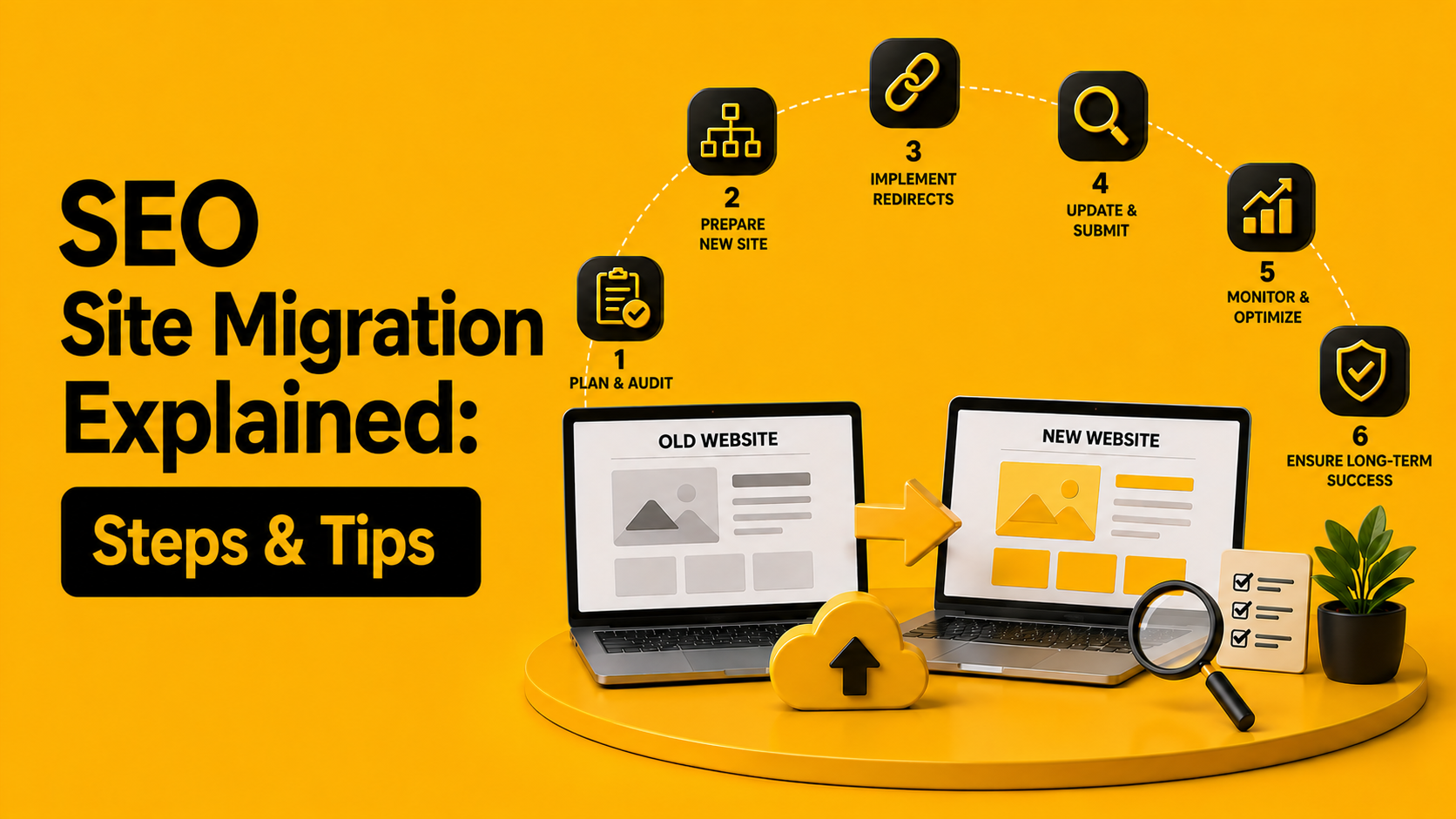
The Complete SEO Migration Strategy
Successful migrations follow three phases:
- Before migration
- During migration
- After migration
Skipping any stage increases your risks.
Phase 1: Pre-Migration
The first step where successful migrations win.
- Crawl Your Existing Website
Make an inventory.
Common tools include:
- Screaming Frog
- Sitebulb
- Ahrefs
- Semrush
Extract:
- URLs
- Titles
- Meta descriptions
- Canonicals
- Status codes
- H1 tags
- Internal links
- Images
- Structured data
This will become your benchmark.
- Export Current Rankings
Export existing keyword positions.
List:
- Top landing pages
- Ranking keywords
- Featured snippets
- Local rankings
You can’t do anything without this baseline.
- Create a Backup
Always migrate with backups.
Backup:
- Database
- Website files
- Redirect rules
- XML sitemaps
- Robots.txt
- Analytics data
- Benchmark SEO Performance
List down:
- Organic sessions
- Conversions
- Indexed pages
- Crawl errors
- Core Web Vitals
- Page speed
- Domain authority
- Backlinks
These metrics will be compared later.
- Map Every URL
This will be the crucial stage.
All old URLs need mapping to new locations.
Old URL
↓
New URL
With no exceptions.
- Highlight High-Value Pages
Identify pages that generate:
- Revenue
- Leads
- Organic traffic
- Backlinks
Protect these first.
Phase 2: Website Migration SEO Checklist
Here’s the website migration SEO checklist professionals use.
- Implement 301 Redirects
Do not use:
- Homepage redirects
- 302 redirects
- JavaScript redirects
Use 301 redirects.
Redirect pages to their nearest equivalents.
- Preserve Metadata
Maintain:
- Page titles
- Meta descriptions
- H1 tags
- Alt attributes
Doing it all at once confuses search engines.
- Keep Content Consistent
Making big changes during migration increases volatility.
Redesign first. Then rewrite.
- Maintain Internal Linking
Internal links pass authority.
Check:
- Broken links
- Redirected links
- Orphan pages
- Navigation
- Update Canonical Tags
The canonical tag must link to the new URL.
Not the old website.
- Generate a Fresh XML Sitemap
Pages to Include:
- Indexable pages
- Canonical URLs
- 200 status pages
Pages To Exclude:
- Redirects
- Noindex pages
- Errors
- Update Robots.txt
Be careful of accidental blocks:
Disallow: /
It’s more common that you might imagine. Especially following staging deployments.
- Validate Structured Data
Verify:
- Organization schema
- Product schema
- FAQ schema
- Breadcrumb schema
- Article schema
Run through the Rich Results Test on Google.
- Improve Core Web Vitals
This is a great opportunity to improve your:
- Largest Contentful Paint (LCP)
- Interaction to Next Paint (INP)
- Cumulative Layout Shift (CLS)
Google will reward improved user experience.
- Optimize Images
Compress:
- PNG
- JPEG
- WebP
Enable:
- Lazy loading
- Responsive images
- Alt text
Phase 3: After Migration
Launch day is just the starting point. The real work begins now.
- Submit the New Sitemap
Submits the new XML sitemap in Google Search Console.
- Monitor Indexing
Monitor:
- Indexed pages
- Excluded pages
- Crawled but not indexed
- Duplicate pages
Once a day for the first month.
- Monitor Redirects
Check for:
- Chains
- Loops
- Invalid redirects
Even one extra redirect may delay crawling.
- Watch Google Search Console
Monitor:
- Coverage
- Page indexing
- Manual actions
- Core Web Vitals
- Enhancements
- Monitor Rankings
Some temporary fluctuations are to be expected. Any sharp drop-offs need to be looked at.
- Check Analytics
Watch:
- Organic traffic
- Bounce rate
- Conversion rate
- Revenue
- Goal completions
The success of the migration is not only defined by the rankings but rather by business performance.
SEO Migration Checklist
Below is a simplified SEO migration checklist that you may follow prior to the launch.
Planning
- Crawl current website
- Export URLs
- Note rankings
- Benchmark traffic
- Backup website
- Perform backlink audit
- Determine prioritized pages
Technical
- 301 redirects
- Canonicalization
- XML sitemap
- Robots.txt file
- SSL verification
- Structured data
- Page speed optimization
- Mobile optimization
- Internal linking
- Meta tags
Post-launch
- Submit sitemap
- Indexing status monitoring
- Redirects check
- Analytics verification
- Google Search Console verification
- Rankings tracking
- Crawl issues fixing
- Traffic monitoring
Common SEO Migration Mistakes
Even experienced teams make these mistakes.
Redirecting Everything to the Homepage
Google dislikes irrelevant redirects.
Every page deserves a matching destination.
Changing URLs and Content Simultaneously
Too many variables make troubleshooting impossible.
Ignoring Internal Links
Thousands of internal links still pointing to redirected pages waste crawl budget.
Update them.
Forgetting Noindex Tags
Staging websites often contain:
<meta name=”robots” content=”noindex”>
Launching with this tag can remove an entire website from search.
Yes, it still happens.
Blocking Google
A forgotten robots.txt rule can silently destroy visibility.
Removing High-Performing Pages
Just because marketing no longer likes a page doesn’t mean Google agrees.
Check performance before deleting anything.
Ignoring Mobile Experience
Google indexes the mobile version first.
Desktop perfection means little if mobile performance suffers.
How Long Does SEO Recovery Take After Migration?
Recovery depends on:
- Website size
- Crawl frequency
- Redirect quality
- Authority
- Migration complexity
Typical timeline:
| Time | Expected Outcome |
| Week 1 | Crawling begins |
| Weeks 2-4 | Rankings fluctuate |
| Month 2 | Most pages stabilize |
| Months 3-6 | Full recovery for larger sites |
Large enterprise websites may take longer. Patience and continuous monitoring matter.
Essential Tools for SEO Site Migration
A successful migration depends on visibility into technical performance. These tools help you identify issues before and after launch.
| Tool | Primary Purpose |
| Google Search Console | Indexing, coverage, sitemap submission, performance monitoring |
| Google Analytics 4 | Organic traffic, conversions, engagement tracking |
| Screaming Frog SEO Spider | Full website crawl, redirect validation, metadata audit |
| Sitebulb | Technical SEO visualization and crawl analysis |
| Ahrefs | Backlink analysis, keyword tracking, link equity monitoring |
| Semrush | Position tracking, site audits, competitive insights |
| Google PageSpeed Insights | Core Web Vitals and page performance analysis |
| Rich Results Test | Structured data validation |
Using these tools together gives you a complete picture of how search engines experience your new website.
Why Professional SEO Site Migration Matters
Website migration isn’t just a developer’s task.
Developers focus on functionality. Designers focus on aesthetics. Marketing focuses on branding. SEO focuses on ensuring customers can still find you.
A successful migration requires collaboration between all teams, guided by a structured SEO framework.
Without it, even a technically flawless website can lose years of accumulated search authority.
Move Your Website Without Sacrificing Organic Growth
A website migration should be an opportunity, not a setback.
Whether you’re moving to a new CMS, redesigning your site, changing domains, or restructuring URLs, a well-planned SEO site migration ensures your rankings, traffic, and revenue remain protected throughout the transition.
At Xparro, we combine technical SEO expertise with data-driven migration planning to minimize risk and maximize long-term organic performance. From comprehensive URL mapping and redirect implementation to crawl audits, indexation monitoring, and post-launch optimization, our team manages every stage with precision.
If your business is planning a website migration, don’t leave your organic visibility to chance. Partner with Xparro to execute a migration strategy that preserves your search equity, protects your revenue, and positions your new website for sustainable growth.